A Better Start to Every Working Day: Introducing the Insurance Buffalo Dashboard
A Better Start to Every Working Day: Introducing the Insurance Buffalo Dashboard
Running an insurance brokerage involves keeping track of many things at once. Renewals approach their maturity dates, clients need to provide outstanding documents, reminders need attention, and team members have their own workloads to manage.
The challenge isn't necessarily a lack of information. Often, the challenge is knowing where to look, what needs attention first, and what needs to happen next.
That's why we've brought these important pieces of information together in the Insurance Buffalo Dashboard.
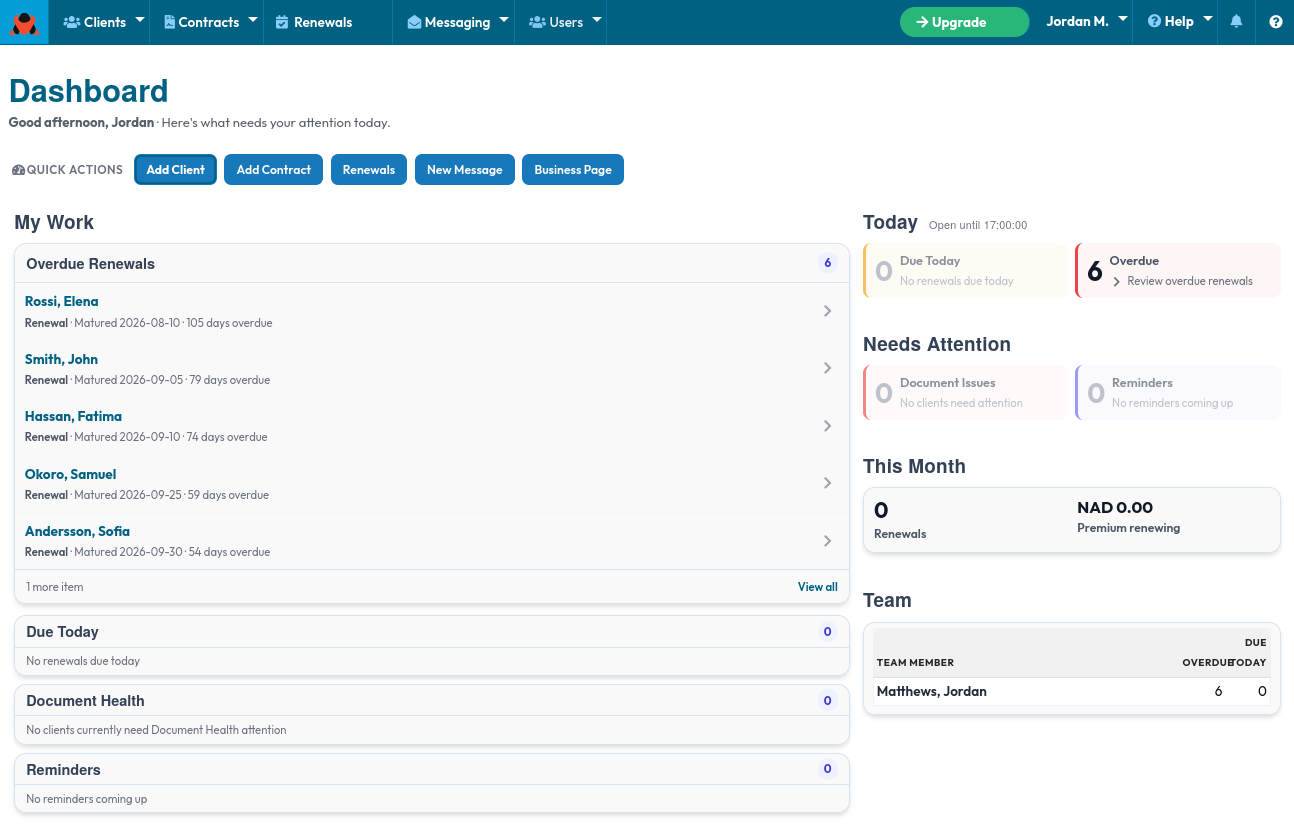
The dashboard gives brokers a central place to start their working day, with a personalised overview of their business, upcoming work and outstanding tasks. Instead of navigating through different sections to build a picture of what needs attention, brokers can see the most relevant information as soon as they log in.
Your working day, at a glance
The dashboard is designed around a simple question:
What needs my attention today?
After logging in, brokers are welcomed with a personalised greeting and an overview of the work that matters. The information is organised into clear sections, making it easier to identify priorities without having to search through multiple screens.
For brokers with access to the Renewal Pipeline, the Today section highlights two particularly important figures:
- Due Today: The number of renewals reaching maturity today.
- Overdue: The number of renewals that have already passed their maturity dates.
Both figures link directly to the relevant renewal records, allowing brokers to move from an overview to the actual work with a single click.
The dashboard also displays the brokerage's business-hours status, including whether it is currently open and when it closes.
These details help make the dashboard more than just a collection of statistics. They provide a useful picture of what is happening right now.
Know what needs attention
Not every important task is linked to a renewal date.
Outstanding client documents and scheduled reminders are equally important parts of day-to-day brokerage management.
The Needs Attention section brings these items into view.
Document Issues
See how many clients have outstanding document requirements. The number links to a filtered client list, making it easier to identify which client records need attention and follow up on outstanding requirements.
Reminders
See the number of scheduled reminders, including upcoming and overdue items. Follow the link to access the relevant client notes and reminder information.
Rather than relying entirely on memory or moving between different sections of the system, brokers have a convenient overview of these important follow-up activities.
Your work, organised into actionable lists
An overview is useful, but knowing exactly which clients need attention is even more valuable.
That's where the dashboard's My Work section comes in.
It organises individual work into four categories:
1. Overdue Renewals
See which clients have renewals that are already overdue, how many days overdue they are, and when the policies matured.
2. Due Today Renewals
Identify the clients whose renewals are due today, together with the relevant maturity time.
3. Document Health
See which clients have outstanding document requirements and how many items still need attention.
4. Reminders
View upcoming and overdue reminders, including the reminder message and scheduled time.
Each category provides a preview of up to five items, with direct links to the relevant client records and a separate option to view the complete list.
And when everything is up to date, the dashboard provides clear, friendly messages rather than leaving empty sections that offer no useful information.
The result is a more practical way to move from knowing that something needs attention to knowing exactly which client or task to work on.
A dashboard that understands your role
Insurance brokerages don't all operate in the same way. An account owner managing an entire brokerage has different responsibilities from an individual broker managing their own client portfolio.
The Insurance Buffalo Dashboard takes these differences into account.
For account owners
Account owners get a broader view of their brokerage. Their dashboard includes their own information as well as information from their child accounts.
They also have access to two additional sections:
- This Month: An overview of the total number of renewals maturing during the current month.
- Team: A breakdown of team members, showing their names, email addresses, overdue renewals and renewals due today.
This makes it easier for managers to see where work is accumulating and identify team members who may need assistance.
For individual brokers and child users
Individual brokers see their own book of business rather than the broader account's information.
Their My Work section remains personal, focusing on their own renewals, documents and reminders.
This distinction helps keep the information relevant to the person using the system, without overwhelming individual brokers with information that does not relate to their responsibilities.
A clearer picture of your monthly renewal business
For account owners with Renewal Pipeline access, the This Month section provides an overview of the renewal activity expected during the current month.
It displays the total number of renewals maturing during that period.
For accounts with Premium / Renewal Intelligence access, it also shows the total premium value of the renewals coming due.
This additional information provides a useful financial perspective alongside the operational renewal figures.
Accounts without access to this premium information can also see how Premium expands the dashboard's renewal visibility.
Get to work without unnecessary navigation
The dashboard also includes a Quick Actions toolbar.
Depending on a user's privileges, frequently used actions can be accessed directly from the landing page.
These include:
- Add Client
- Add Contract
- Renewals
- Data Collector
- New Message
- Business Page
Not every user sees every shortcut. The available actions depend on the user's permissions and account access.
The idea is straightforward: make frequently used tasks accessible from the place where brokers already start their working day.
More than an overview
A dashboard can easily become a place where information is displayed but nothing actually gets done.
We wanted the Insurance Buffalo Dashboard to be more useful than that.
Its figures and work categories are connected to the relevant parts of the system. A renewal count can take you to the renewals that make up that number. A document issue can take you to the clients who need attention. A reminder can take you to the relevant client information.
The dashboard also adapts to the user's role and available account features.
It brings together renewal visibility, document requirements, reminders and team workload in one practical starting point.
Whether you're an individual broker concentrating on your own clients or an account owner overseeing a team, the goal is the same: spend less time figuring out what needs to be done and more time getting it done.
Start your day with a clearer picture
The Insurance Buffalo Dashboard is part of our ongoing effort to make brokerage management more organised, accessible and practical.
By bringing important information together and connecting it directly to the work behind it, we aim to help brokers stay informed and keep their daily responsibilities moving.
Explore what Insurance Buffalo can do for your brokerage.
Start your 30-day free trial at insurancebuffalo.net.
No credit card required and no automatic subscription.
Your  Insurance Buffalo Team
Further Information
We value your input and strive to meet your needs.
Take advantage of our free trial offer today to experience our solution for yourself.
No credit card required.
No automatic subscription.
See how our platform can help your business grow.
For additional information, please refer to the following pages:
Frequently Asked Questions
Features of Insurance Buffalo