Essential Tools for Your Insurance Business: Discover Our Top Features

A Note for You
We are thrilled to introduce our latest system tailored to empower Insurance Brokers and Agents with a suite of essential tools. Our platform currently boasts a range of critical features, and we are committed to ongoing enhancements to better serve your evolving needs. Your insights matter to us, and we actively invite your feedback and suggestions to further refine and optimize the system. While we've diligently worked to ensure a seamless experience, we acknowledge that, like any sophisticated system, there may be unforeseen bugs. Our dedicated team is committed to promptly addressing and resolving any challenges.
Please don't hesitate to share your thoughts with us anytime; together, we can shape an even more effective solution for you.

Renewal Pipeline
Work your renewals.
See all upcoming renewals in one queue and work each one through a clear, accountable workflow. Each renewal brings together the client, contract, maturity date, current stage, assigned staff member and the time it was last changed.
Move each renewal through seven stages:
Upcoming → Contacted → Quote in Progress → Quote Ready → Proposal Sent → Accepted / Lost
Stage changes are recorded automatically, giving your team a clear history of progress. The Last changed timestamp makes it easier to see where work has stalled and which renewals need attention.
- Filter by stage, assigned staff member and renewal period
- View this month, the next three months or all renewals
- Surface overdue renewals for attention
- Change stages and reassign renewals in place
- Move directly between renewal, client and contract records
- Account owners see their portfolio and child users, while child users see their own renewals
Every renewal has an owner, a current position and a visible history of activity.
Renewal Pipeline
Professional includes the Renewal Pipeline.
Renewal Intelligence
Win rate
Retained premium
Average contact lag
Active overdue exposure
Average time in stage
Renewal Intelligence
Understand your renewal operation.
See not only how many renewals you have, but how effectively your team is working them. Renewal Intelligence turns activity in the pipeline into management information.
Monitor win rate, retained premium, average contact lag, active overdue exposure and average time in stage.
Compare the current month, the next three months or your full renewal book. Use the same account and user visibility as the Renewal Pipeline.
Stage duration helps identify bottlenecks in the renewal process, so managers can see where work is slowing down and where follow-through needs attention.
Renewal Protection
Keep every renewal accounted for.
Keep active contracts with maturity dates represented in your renewal workflow, so upcoming and unresolved business remains visible.
The right people are reminded at the right time, with scheduled notifications ahead of maturity and escalation when a renewal becomes overdue.
- Every active renewal stays accounted for
- Upcoming renewals are surfaced before maturity
- Owners and assigned staff receive relevant reminders
- Overdue renewals remain visible until they are resolved
- Completed renewals stop generating unnecessary renewal alerts
- See what matured, what was resolved and what remains unresolved
- Understand your unresolved renewal exposure and premium at risk
Renewal Protection provides operational visibility and follow-through. It helps your brokerage account for its renewal book without implying a guarantee of client retention.
Renewal Protection
Upcoming
Reminder
Attention
Overdue
Resolved
How Renewal Management is included
Professional provides the Renewal Pipeline. Premium adds Renewal Intelligence and Renewal Protection.
Basic
No renewal functionality.
Professional
Renewal Pipeline
Premium
Renewal Pipeline
Renewal Intelligence
Renewal Protection
Contracts tell you what is coming due. Renewals tell you what you're doing about it.
Contract Management is your system of record for the contracts you manage. Renewal Management turns that information into a workflow your team can act on.
Master client management with ease. Add and update client records quickly and easily, and keep track of all their essential details. With the At a Glance overview, key client information is instantly visible, helping you understand each client without switching between tabs. Here's what you can do:
- Store and manage client addresses, phone numbers, email addresses, and social media contacts
- View important client insights at a glance, including age, coverage types, contract count, total premium, upcoming contract maturities, reminders, and activity status
- Add notes and format them to suit each client's unique requirements
- Assign custom status levels to each client to reflect their importance or status
Looking for a specific client? No problem. Our powerful search and filtering tools help you find clients quickly and easily. Here are just a few of the criteria you can search by:
- Name
- Phone number
- Birthdate
- Custom status
- Contract role
Whether you're preparing for a client meeting or reviewing your portfolio, you'll always have a clear overview of your clients and the contracts they're part of. Make client data management faster, simpler, and more efficient.

Create custom client lists to organize the people you need to follow up with or manage differently.
- Create lists of clients you want to contact soon
- Collect clients who have shown recent interest in changing their contract
- Group clients who have contacted you by phone
- Organize clients who are eligible for a certain contract type
- Create additional lists to match your own workflow
Keep the clients you need to work with together and accessible from the same system as the rest of your client information.

AuditTrack records changes to important information in the system, giving you a history of what changed and helping you retrieve previous information when needed.
- Track changes at the database level
- See data changes and updates over time
This provides a reliable history of changes to support data management and auditing.

Manage the contract records your brokerage relies on and keep the important information associated with each contract accessible.
Contract data includes:
- Insurance company
- Contract type
- Premium amount
- Inception and maturity dates
- Associated clients
Search and filter contracts by information such as:
- Contract number
- Contract status
- Inception date
- Maturity date
- Other available contract information

Track commissions alongside the contracts that generate them.
- Set commission rates by contract type
- Track earnings from individual contracts
- Identify contracts by their commission value
Keep commission information connected to your contract data instead of maintaining it separately.

Seamless Document Association: Connect client documents effortlessly within Fileo, ensuring immediate access to crucial files whenever needed. Say goodbye to scouring emails or other folders for urgently needed files.
- Efficient Organization and Intuitive Interface: Navigate through your files effortlessly, saving valuable time and maintaining a clutter-free digital workspace.
- High-Level Security with Cloud Technology: Fileo is built on state-of-the-art cloud technology, specifically Microsoft Azure, ensuring the highest level of protection for your valuable files. Your data's security is our top priority.
- Instant Access to All Client Documents: Have all client documents at your fingertips.
- Available Across All Tiers: From Basic to Premium, Fileo is accessible to all users.
Fileo's initial release was in October 2023, and we are continually adding new features. To unlock the full potential of Fileo, all you need is an account with Insurance Buffalo – your gateway to a seamless, secure, and organized client document management system.

Receive notifications about important events across your account so that follow-ups and deadlines are less dependent on memory.
Configure notification timing to suit your workflow and receive notifications through the system and by email.

Create a public business listing that helps potential clients discover your brokerage and understand what you offer.
- Make your business and name available to search engines
- Let clients find you by business name, phone number and area of operation
- Show languages, insurance brands and products you offer
- Display business hours and a dedicated Internet address
- Add a sales pitch and description of your business
- Allow potential clients to contact you without exposing your email address
Sign up for your free business listing.

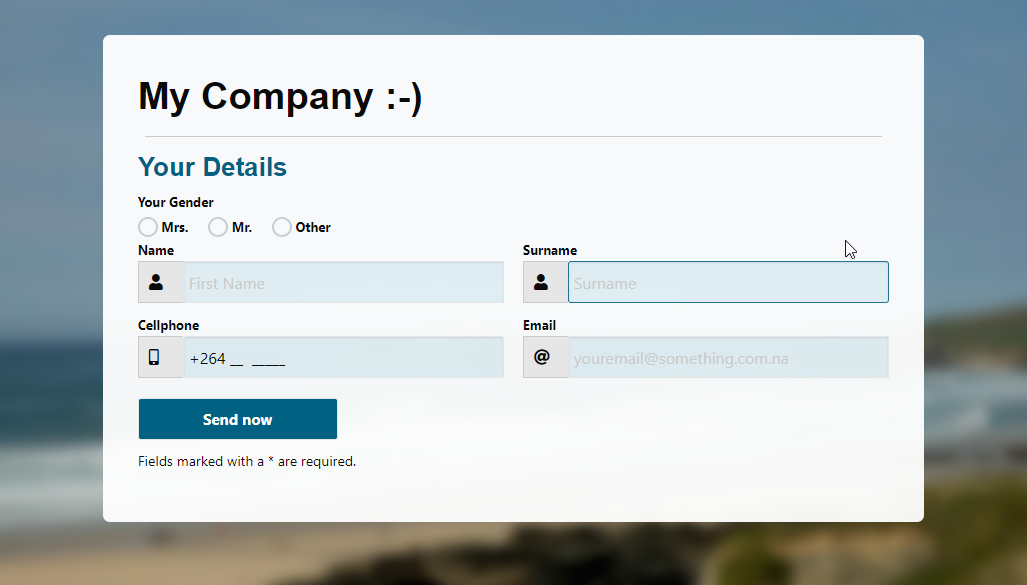
Collect client information through a short, easy-to-share URL and make newly submitted data available in Client Management.
- Give potential clients a short URL to your input form
- Collect client information without manual re-entry
- Access newly acquired clients in Client Management
Send email messages to multiple clients at once while keeping the recipients relevant to your workflow.
- Send emails to multiple recipients at once
- Select recipients from your client lists
- Personalize messages for different client groups
Use your client information and lists as the basis for communication instead of maintaining separate mailing lists.

Add users to your account and give your team controlled access to the client, contract and brokerage information they need.
- Add, remove and edit user accounts
- Let users manage their own clients and contracts
- Control access to clients and contracts through user privileges
- Allow selected users to manage the business page and send messages
- Account owners can maintain an overview of their brokerage
User limits depend on the package selected for your business.

Create reminders for specific dates and times and receive them through the system and by email.
- Schedule reminders for specific dates and times
- Include client details with reminders where relevant
- Receive reminders through on-site notifications and email
Keep follow-ups and deadlines connected to your client information.

Move your existing client and contract information into Insurance Buffalo with help from our data experts.
- Our data experts can import your clients and contracts for you
- Access your business information from Internet-capable devices
- Keep business files accessible from the same system
- Transmit data securely over an encrypted connection
Contact us for details about data import.

Have a question? We're here to help.
Ask us about a feature, your workflow, data migration, or which package fits your brokerage.
Further Information
We value your input and strive to meet your needs.
Take advantage of our free trial offer today to experience our solution for yourself.
No credit card required.
No automatic subscription.
See how our platform can help your business grow.
For additional information, please refer to the following pages:
Frequently Asked Questions
Features of Insurance Buffalo